
App · Camera awareness
FlockOff
Mapped cameras. Nearby alerts. Awareness on the road.
About FlockOff
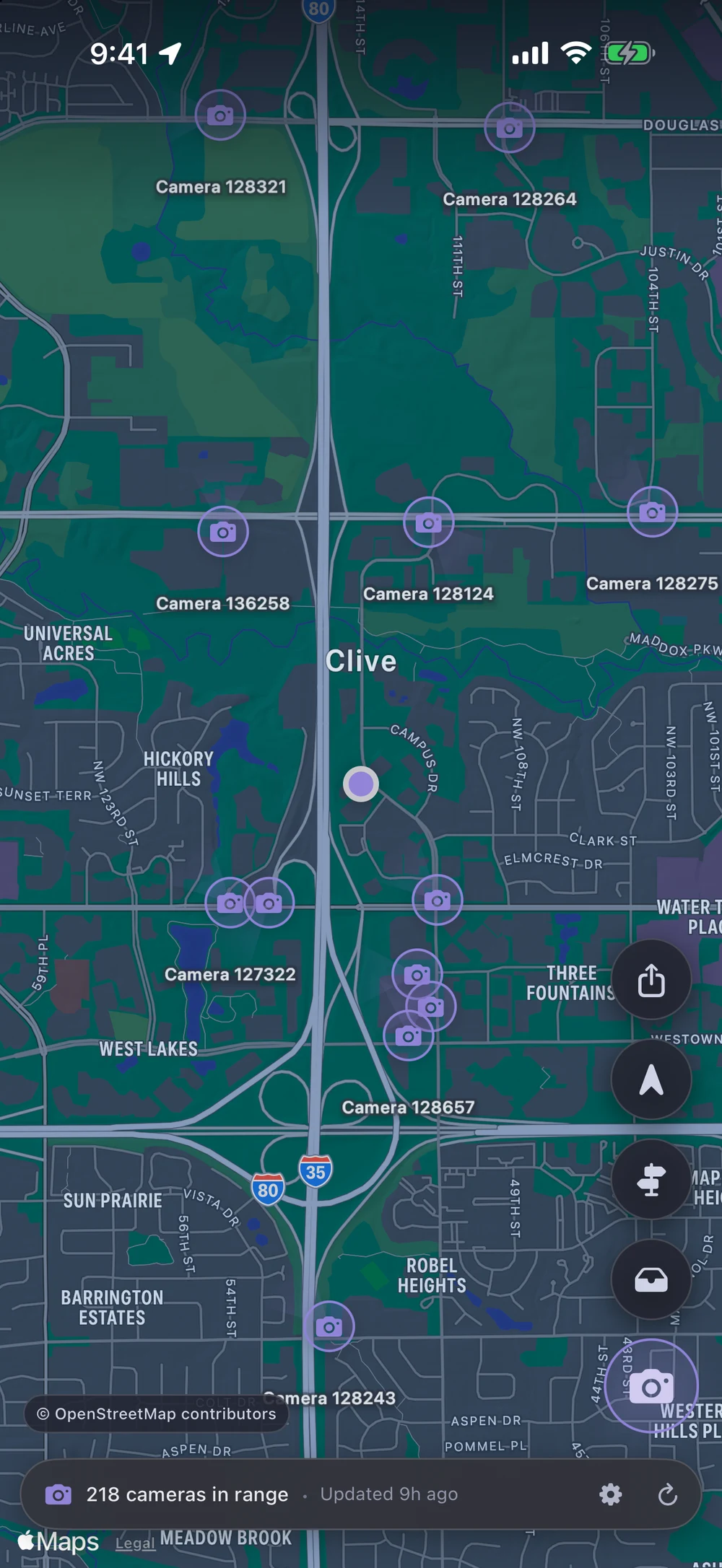
FlockOff shows mapped license plate readers and traffic cameras around you. Explore the map, get proximity alerts, and see camera context along a route.
Camera records come from OpenStreetMap. Proximity matching happens on your device, and you can choose the alert distances and sounds that suit you.
For app-specific help and details about data handling, visit FlockOff support or read its privacy policy.
- Nearby camerasCommunity data on a clear map.
- Your alertsAdjust distances, tones, and haptics.
- On-deviceLocal proximity matching.
Good to know.
Where does the camera information come from?
FlockOff uses community-maintained OpenStreetMap records. It shows mapped cameras; coverage depends on what contributors have added.
Can I adjust the alerts?
Yes. Settings let you configure proximity thresholds and alert sounds. Stealth Mode uses haptics instead of audio.
Can I report a camera?
You can create a report from the app or through Siri. Review the location and details, then explicitly submit it to OpenStreetMap with your connected account.
Does FlockOff upload my travel history?
FlockOff does not operate a backend that receives your travel history. Map, route, and camera-data requests use third-party services; the privacy policy explains those requests and the local data the app stores.
Where can I get help?
Visit FlockOff support for app-specific information, or email Goldshorts with your device, iOS version, and a description of the issue.
Need a hand?
Tell us you’re using FlockOff, your device model, your iOS version, and what happened. Screenshots help, too.