
Web & mobile app · Floral workflow
Floral Cookbook
Arrangement recipes, organized for the way a flower shop works. Built for the browser and iPad.
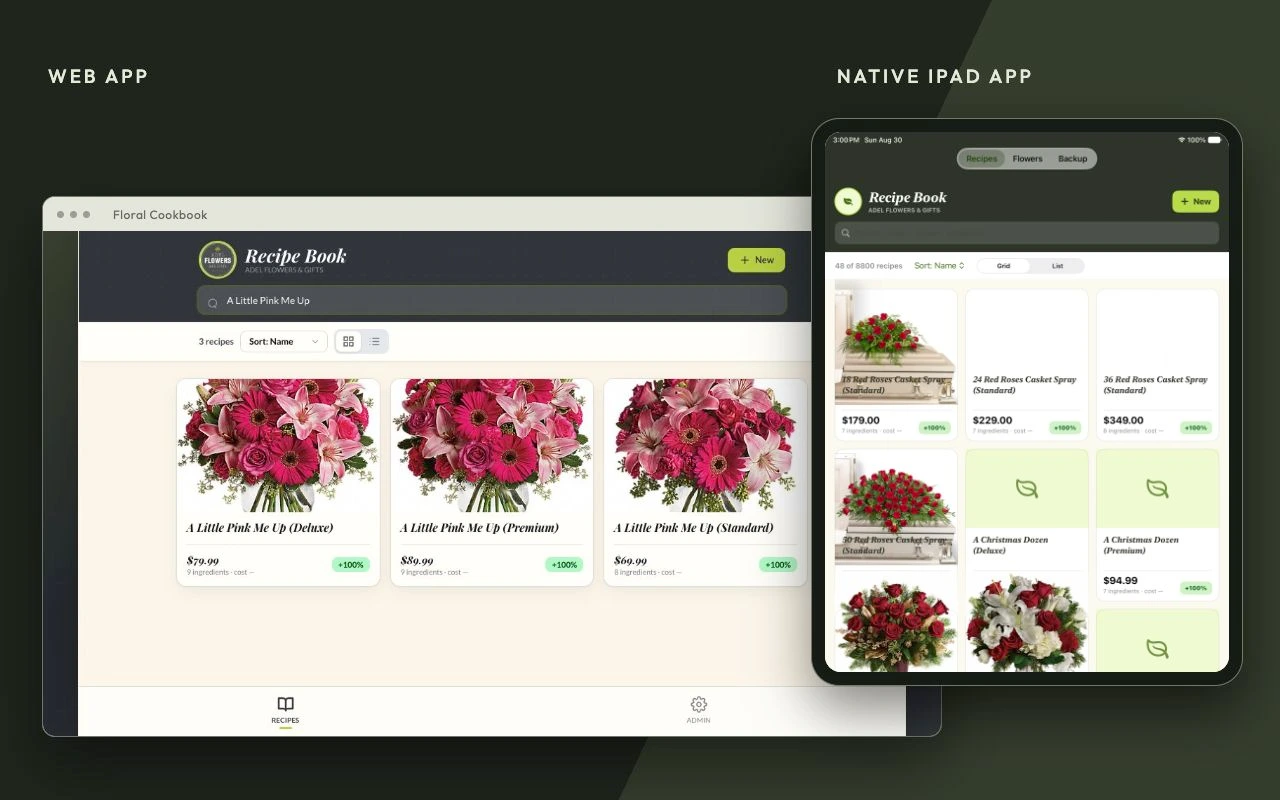
From recipe to arrangement.
Floral Cookbook gives a flower shop a searchable library of arrangements, with photos, ingredient lists, flower prices, and cost and margin calculations. Find a design, check what goes into it, and keep the recipe close at hand while building it.
- Web appBrowse and manage the recipe library in the browser, with search, grid and list views, and recipe editing.
- Mobile app for iPadA native app for the design bench, with local recipes and photos, iCloud sync, and portable backups.
- Custom vendor integrationsIntegrations with two of the top names in flowers bring arrangement recipes and photos into the web app’s library.
Built around the shop.
The browser and tablet versions share the same purpose: keeping floral knowledge organized and usable. The native iPad app stores its library locally and supports archive import and export, so recipes, ingredients, and photos can move together.
Good to know.
What does a recipe include?
Arrangement photos, ingredients and quantities, and costing based on the flower price directory. Search the library to find a design and review what goes into it.
How do the web and iPad apps work together?
The web app includes custom recipe imports from two floral vendors. The native iPad app is the shop’s staff application, with local storage and private iCloud sync. Portable archives move recipes and photos between versions; there is no direct live sync between the web server and iPad.
Can the library be backed up?
Yes. The iPad app can export recipes, flower records, and photos together in a portable archive. Its restore flow supports replacing the library or merging an archive into it.
Is there a public download?
Floral Cookbook is a custom shop project. This page showcases its web and native iPad interfaces; it does not offer a public App Store release.
Need a hand?
Tell us you’re using Floral Cookbook, your device, operating system and browser version (if applicable), and what happened. Screenshots help, too.